How it works, in plain words.
Three simple ways to know who's really on the other end. Each one takes a minute to learn.
The secret phrase
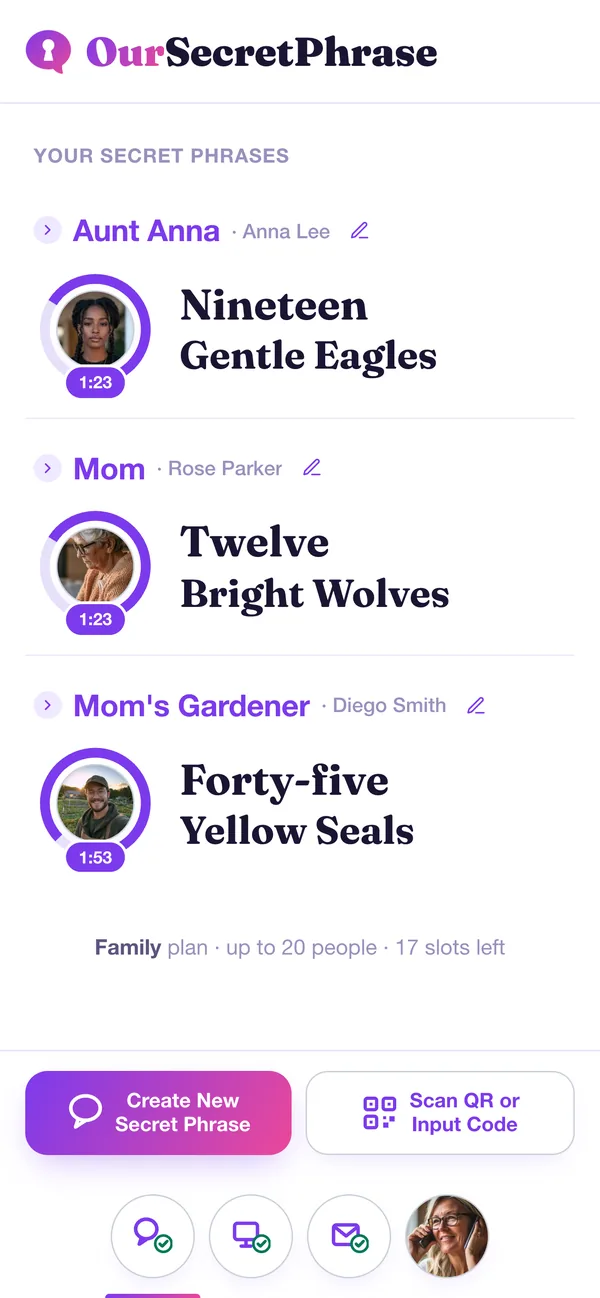
You and each person you trust get the same live phrase: a number and two words that only your two phones know. It changes every 2 minutes, so it can't be guessed, overheard or reused.
Pair once
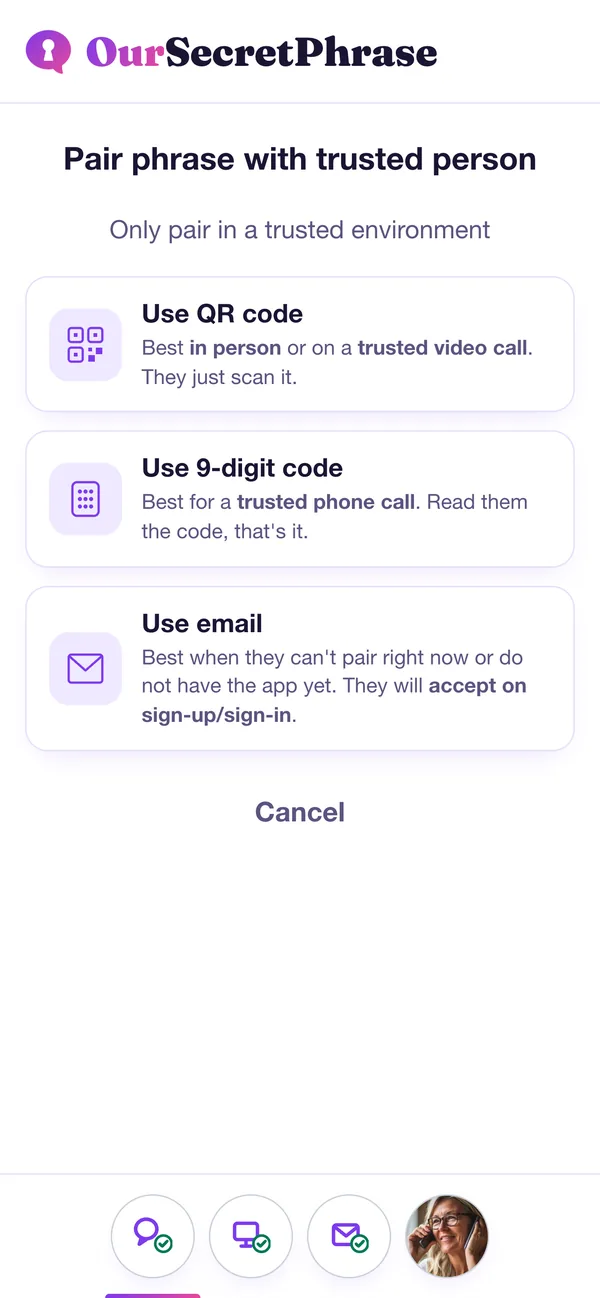
Tap Create New Secret Phrase and pick how: a QR code in person, a 9-digit code read over the phone, or an email invite they accept later. Do it when you know it's really them.
Ask for it on a call
Each person has their own phrase on your Home screen. On a call, ask them to read theirs. If it matches, it's them. If not, hang up and call back on a number you know.
See who they are
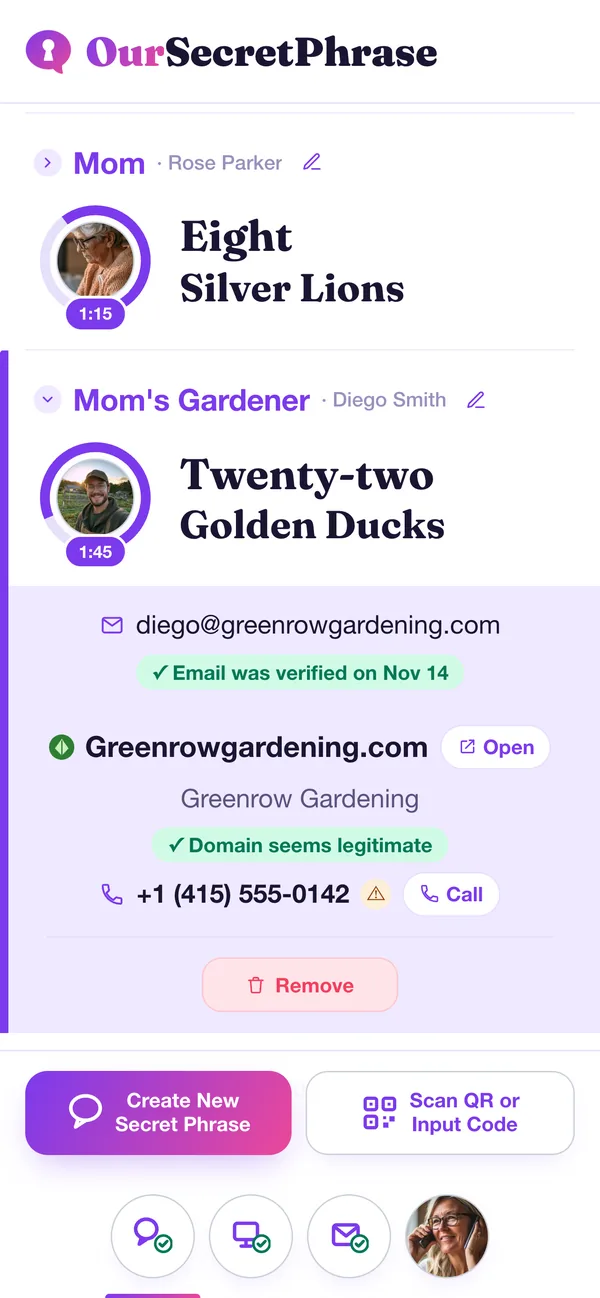
Tap a name to see their verified email, their company, and a warning if the email domain looks new or fake.
On all your devices. Add your laptop or a tablet and they show the same phrase. Each new device pairs with each person on its own, and a lost phone can be cut off in one tap.
The QR code
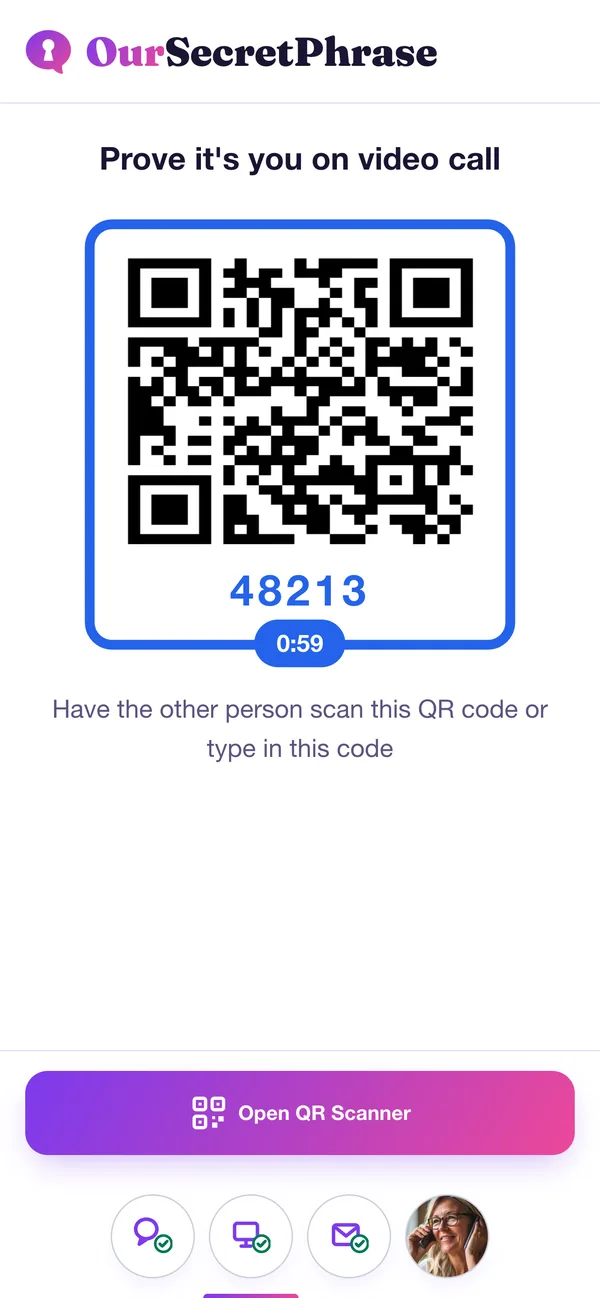
Prove who you are on a video call, or ask the other person to. It works with anyone, even someone you've never paired with: a colleague, your bank, a supplier.
Show your code
Tap the Prove button. A live QR code appears, tied to your verified email. It changes every minute, so a screenshot is useless.
They scan it
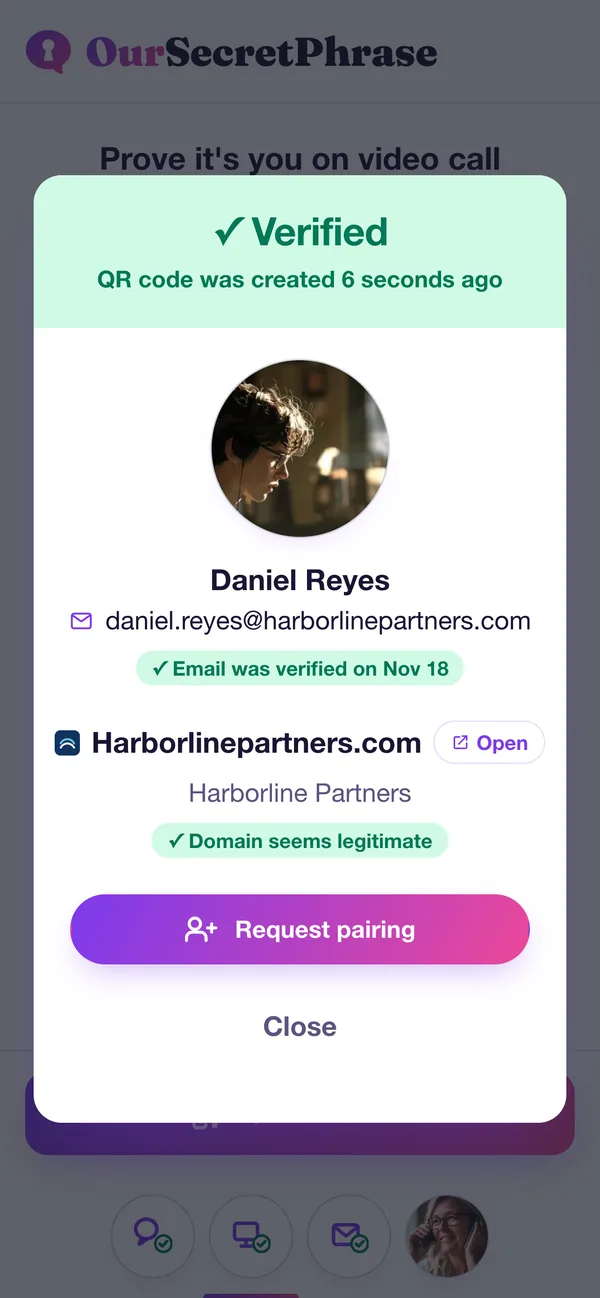
They tap Scan QR or Input Code and point their camera at your screen. They instantly see your real name, verified email and company.
No camera?
On a phone call, read out the 5-digit code under the QR. They type it in instead.
Turn it around
Someone says they're from your bank or IT support? Ask for their QR code before you do anything they ask.
The signature
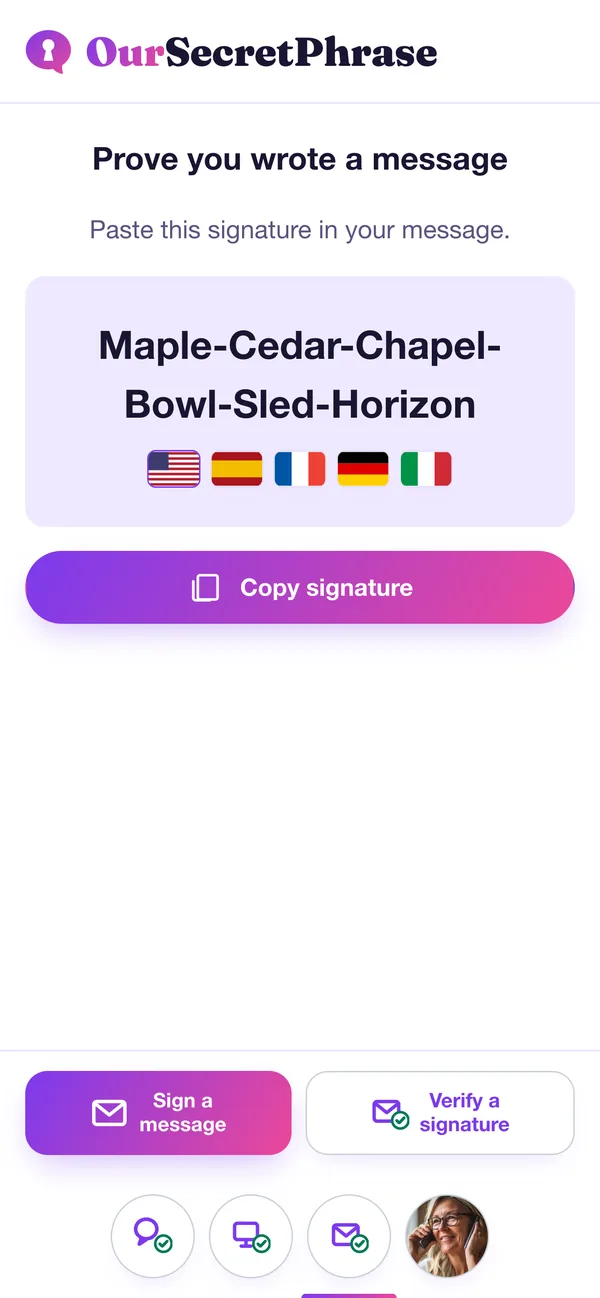
Add a short signature to any message, and anyone can check it really came from you. No pairing needed.
Sign your message
Tap the Sign button, then Copy signature, and paste it at the end of your text or email. It's six words, tied to your verified email.
They check it
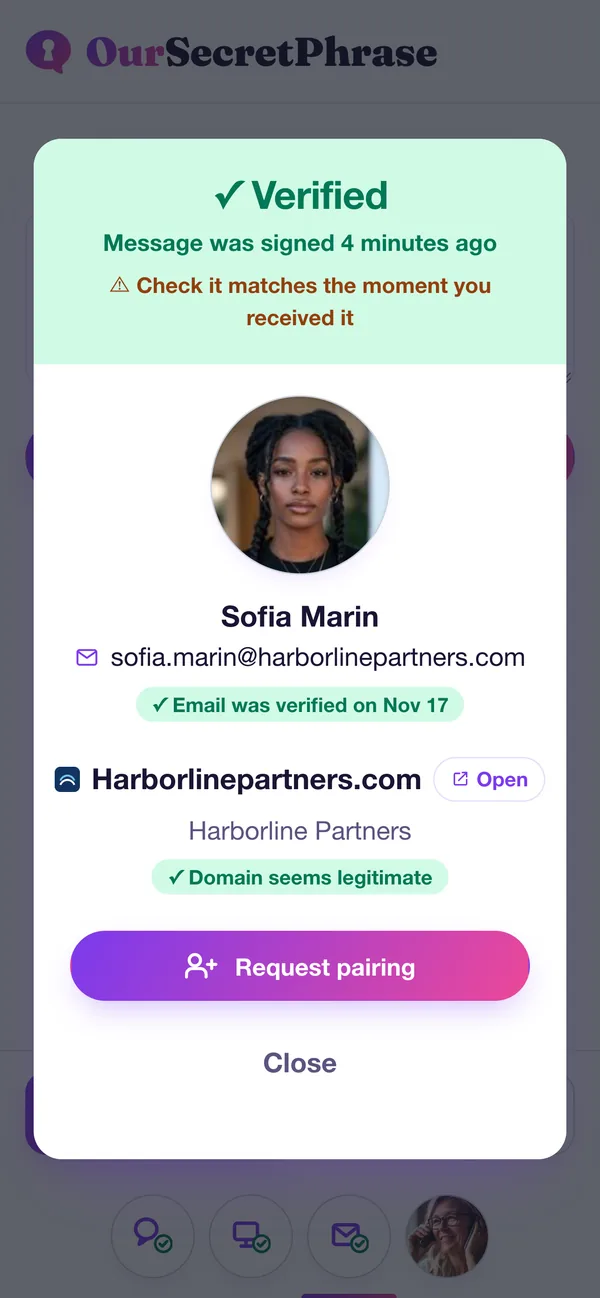
The person who gets it taps Verify a signature and pastes your message. They see who signed it and when.
Got a suspicious message?
Ask the sender to sign it. A scammer can't make a signature for an account that isn't theirs.
Any language
Signatures come in English, Spanish, French, German or Italian. Tap a flag to switch.
Your Account screen
Your profile, your devices, and how the app locks itself when you're not looking.
Every device signed into your account. The one you're holding is marked "(this device)".
Phone lost or stolen? From any other device, tap this on the missing one. It's logged out and unpaired instantly, so whoever has it can't pretend to be you.
On iOS, turn on Require Face ID to lock the app behind Face ID (or your passcode) whenever it's been in the background a couple of minutes — on top of your normal login, not instead of it.
Frequently asked questions
Pricing, everyday use, and what happens to your data.
Getting started
Is OurSecretPhrase really free?
Yes. The Basic plan is free and lets you verify up to 2 people — no credit card needed. To protect the person who needs it most, usually a parent or grandparent, the Family plan is $39.99 a year and covers up to 20 of their close ones. Businesses verifying customers or partners can use the Corporate plan, $99.99 a year for up to 200 people.
How long does it take to set up?
A couple of minutes. Sign up with your email, then pair by scanning a QR code together or reading out a 9-digit code. That's it.
What do I need to give you to sign up?
Just an email address. No phone number, no address, no ID, on purpose. The proof comes from pairing when you already know who you're with, not from a document.
Do I need to be near the other person to pair?
Not necessarily. Scan a QR code together if you're in the same room, read a 9-digit code over the phone if you're not, or send an email invite they can accept later.
Can I use it on both my iPhone and my computer?
Yes. OurSecretPhrase works in any browser, on any device — phone, tablet, or computer. You can be signed in on more than one at a time.
Does the other person need the app too?
They need a free account. To check a close one with the secret phrase, you also need to be paired. To check a stranger, like someone claiming to be your bank, no pairing is needed: ask for their live QR code or a signed message.
Can I sign in with Google?
Yes. On the sign-up or log-in screen, tap "Continue with Google" — no separate password to create or remember.
Using it day to day
How do I actually check that it's really them?
Open the app, find their name, and ask them to read out the phrase on their screen. If it matches what your phone shows, it's really them. If it doesn't match, hang up and call back on a number you already trust.
What if the phrase doesn't match?
Don't continue the conversation. Hang up and call the person back on a number you already have saved — not one they just gave you.
Why does the phrase keep changing?
It refreshes every two minutes so an old phrase — overheard, recorded, or leaked — is useless. Only your two devices can compute the current one.
How many people can I pair with?
Two for free. Up to 20 with the Family plan ($39.99/year), or up to 200 with the Corporate plan ($99.99/year). We count people, not devices, so extra phones never use a slot.
Basic — Free
Two people, no cost, no card. Good for verifying the one or two people you'd act on a call or text from.
Family — $39.99/yr
One Family plan covers the person who needs it most and up to 20 close ones. Everyone else pairs in free.
Corporate — $99.99/yr
Give up to 200 customers or partners a free way to verify it's really your team, not an impersonation scam.
Can I use OurSecretPhrase for texts and emails, not just calls?
Yes. Tap "Sign a message", copy the signature into your text or email, and the person who receives it can paste it into the app to confirm it's really from you.
Can I give someone a nickname?
Yes. Open their entry and tap "Nickname" — it's just a label for you (like "Mom" instead of their full name), and doesn't change anything about how verification works.
What happens if I upgrade my plan?
Moving from one paid plan to a bigger one — Family to Corporate, for instance — credits you for the unused time on your current plan, so you're never paying twice for the same period. Moving up from the free Basic plan is just a normal first purchase.
What if I forget to check and something feels off later?
You can always check afterward — but the safest habit is to check the moment something feels even slightly strange, before you act on it. You never need a reason.
Security & privacy
Can OurSecretPhrase see our secret phrase?
No. It's created directly between your two devices and never sent to our servers. We couldn't hand it over even if we wanted to.
What happens if I lose my phone or it's stolen?
Log in from any other device — a computer, a tablet, another phone — and revoke that device. Every connection it had stops working instantly, even if someone unlocks it.
If I get a new phone, can I restore my old secret?
No — and that's by design. Because we never store your secret, we can't recover it either. You simply re-pair with your contacts on the new phone; it takes a couple of minutes.
Could a scammer fake the phrase with AI?
No. The phrase isn't guessed from someone's voice or face — it's computed from a secret shared only by your two devices. An AI clone can sound exactly right and still not know it.
Could someone guess our phrase, or find it online?
No. It isn't a security question or something findable about you — it's a fresh secret your two devices agreed on when you paired, unrelated to any personal information.
Do you sell or share our data?
No. We verify your email periodically so accounts stay real, but your secret phrase itself never touches our servers, and it's never shared or sold.
Protect your close ones. It takes a minute.
Free. No credit card. Set it up before you need it.